



We get it. Choosing the right clipping software can be overwhelming with so many options claiming to be the best.
You want tools that catch every kill without slowing down your game. But checking out features like AI detection and cloud upload takes time you’d rather spend gaming.
This guide cuts through the noise. We’ve ranked the top clipping apps for gamers who need quick replays and clips ready to share. Let’s dive in.
What Is Clipping Software?
Clipping software is a tool that uses Instant Replay to capture your best gameplay moments by buffering in the background, while keeping your system lag-free.
This clipping app saves the last few seconds of action when a hotkey is pressed or auto-capture detects a big play. It saves that segment instantly.
With this software, you can turn kills and clutch plays into game highlights. They come out ready for social sharing on TikTok, Reels, or YouTube Shorts.
You heard that right. No need to sift through hours of footage or dump files into Adobe Premiere just to find one good play.
For a gamer, this changes everything. You no longer have to guess if a Valorant match will be “record-worthy” before it starts.
You just play. You can focus entirely on clutching that 1v5 without the pressure. It frees you from the anxiety of performing for a VOD.
Best Clipping Software for Gaming Content Creators
Here are some of the best clipping software that you can use to create awesome content:
1. NVIDIA ShadowPlay
- Platform: Windows
- Price: Free
- Category: Free clipping software
NVIDIA ShadowPlay is one of the best clipping tools for PC gamers. It uses your GPU to smoothly capture high-quality clips in popular games like Fortnite, PUBG, Apex Legends, and League of Legends.
You’ll never miss a clutch play. The recording capability is integrated at the driver level, making it more reliable than many other options.
It works directly with GeForce GPUs, so it clips without slowing down your game, which is vital for competitive titles like Valorant, Call of Duty: Warzone, and League of Legends.
Power-User Features:
- NVIDIA Highlights — Automatically captures clips when the game triggers specific API events like kills, deaths, assists, and victories in supported titles.
- Instant Replay Buffer — Continuously records gameplay to RAM/VRAM with a rolling buffer. Press Alt+Shift+F10 to instantly save the last 15 seconds up to 20 minutes as a clip.
- 8K & 120 FPS Support — Save clips at native 8K60fps or 4K120fps. This ensures high-quality, future-proof recording for high-refresh, high-resolution gaming.
- Per-Game Clip Profiles — Set unique instant replay durations, quality, and hotkeys for each game, like 30 seconds for FPS or 3 minutes for strategy titles.
- Quick Clip Gallery — Built-in gallery (Alt+Z overlay) shows recent clips with hover-preview thumbnails. It lets you identify and delete failed clips quickly, no need to open file explorer.
Why this clipping software might be for you? It’s the best choice for people who have NVIDIA graphics cards and want to record your stream like a pro without slowing down their computer.
2. OBS Studio
- Platform: Windows, macOS, Linux
- Price: Free
- Category: Free clipping software
If you’re already using OBS Studio for streaming, you don’t need another clipping software cluttering your drive. It captures those viral game highlights right out of the box.
The key feature is the Replay Buffer, which works like Instant Replay. It runs quietly in the background, so your game stays lag-free, and it saves the last 60 seconds instantly.
Is it powerful? Yes. But unlike auto-capture tools like Outplayed, OBS needs manual setup. This extra step ensures crisp 4K/60FPS clips for social media without Discord chat interruptions.
Power-User Features:
- RAM-Assisted Replay Buffer — Uses RAM for temporary storage, reducing SSD wear. Clips are saved to disk only when exported.
- Application Audio Capture — Offers advanced isolation, saving clips with Game Audio, Discord Chat, and Microphone on separate tracks—ideal for editing out friends’ screams.
- “Clean” Feed Clipping — With the “Source Record” plugin, stream with overlays but save a “clean” gameplay version without UI blocks.
- Lossless Remuxing — Clips in MKV format that won’t corrupt if the game crashes, then automatically convert to MP4.
- Exact Buffer Customization — Set the replay buffer to an exact second (e.g., 17s), unlike preset options, for precise RAM control.
Why this clipping software might be for you? One of the best clipping software that offers detailed control and high-quality output for casual gamers or content creators needing professional clips.
3. Medal.tv
- Platform: Windows, Android
- Price: Free / $9.90/month (Premium)
- Category: Freemium clipping software for gaming
Another free clipping software for gaming, with a premium option for $9.90. If you go for the paid version, you can upload clips up to 30 minutes long and get quality up to 1440p.
Medal.tv is perfect if you want instant highlights without complicated setups. It automatically detects in-game events like kills or wins.

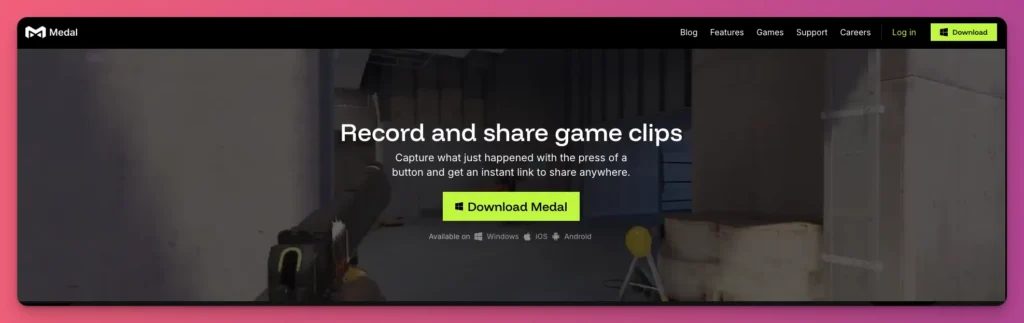
Think of this clipping software as a bridge between a recording tool and a social platform. After capturing a clip, send it to your phone, add meme templates, and share on TikTok or Discord.
Power-User Features:
- AI-Powered Auto-Capture — Automatically clips kills, deaths, and wins by reading game API data. No manual saves needed, ideal for fast-paced highlights across 1,000+ games.
- Automatic Cloud Upload with Unlimited Storage — Clips auto-upload to Medal’s cloud, accessible, editable, and shareable anytime—no storage limits.
- One-Click Sharing — Instantly share to platforms like Discord, TikTok, X, Reddit, and more without manual export.
- Session-Based Clip Grouping — Clips from a gameplay session automatically group, making it easy to review and find top highlights.
- DMCA-Free Music Library — Includes a licensed music library to drag and drop over your clips, replacing game audio.
Why You Need to Use This: You want the fastest workflow from hitting a clip on PC to posting it on your phone without file transfers.
4. Xbox Game Bar
- Platform: Windows
- Price: Free
- Category: Built-in clipping software
Got a Windows PC? Then you already have a built-in clipper with Xbox Game Bar. Just press Win + G and a screen will appear to grab an Instant Replay of the last 30 seconds.
Want better sound for your game highlights? The “Game Only” mode mutes the chat and music, but it might not work perfectly every time.
You don’t have to change to windowed mode to take full-screen screenshots. This clipping software captures lag-free footage well, even when others have trouble.
Power-User Features:
- System-Level Background Recording Buffer — Built into Windows 11/10, it continuously records gameplay, ready to save clips instantly with Win+Alt+G.
- Adjustable Retrospective Clip Length — Set the buffer from 15 seconds up to 10 minutes, balancing RAM and clip duration.
- Automatic Clip Organization — Clips save to Videos\Captures with standardized names: [Game Title] [Date] [Time].mp4, automatically indexed and grouped by game.
- Per-Game Clip Quality — Customize resolution (720p, 1080p, 4K) and frame rate (30fps, 60fps) per game for optimal quality and size.
- Background Clip Cleanup — Use Storage Sense to auto-delete clips older than 30/60/90 days, preventing storage overload.
Why should you use this clipping software? This clipping software can be a dependable backup for Windows users when other programs fail. It’s fast, free, and reliable.
5. Outplayed
- Platform: Windows
- Price: Free / $2.99/mo (Premium)
- Category: Freemium clipping apps
Outplayed makes the whole process much easier by handling auto-capture behind the scenes via Overwolf.

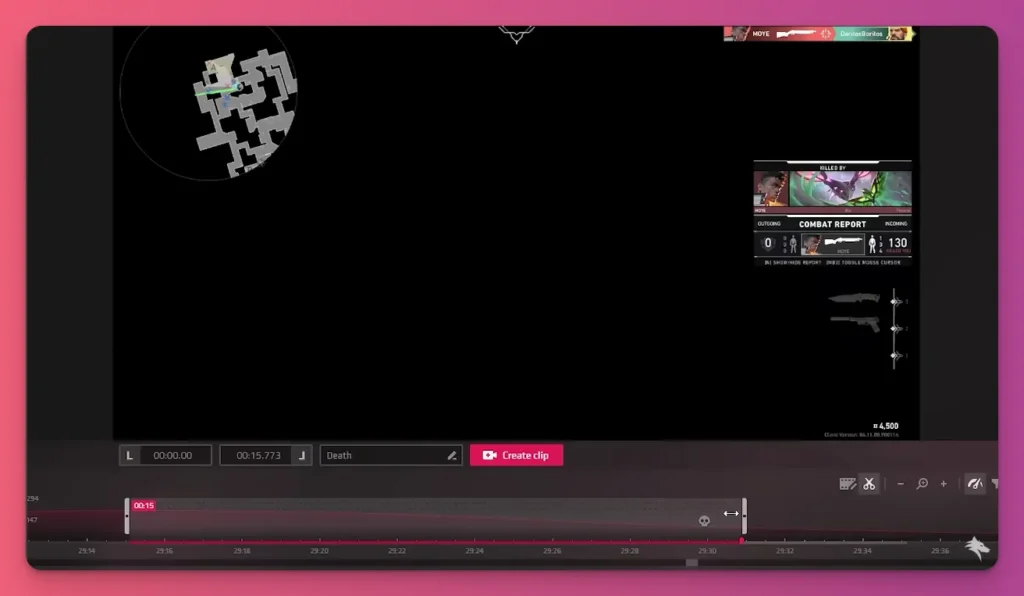
Unlike generic clipping software that relies on hotkeys, it uses direct API hooks into games like League of Legends. It reads data in real time to keep your gameplay lag-free.
This helps you spot events like knockdowns or full kills, so you can organize your game highlights.
You get a post-match timeline that looks just like a video editor. Each big moment shows as a clickable icon for instant replay.
Power-User Features:
- Automatic Event-Based Clipping — AI auto-saves clips from 70+ games for kills, deaths, assists, wins, and objectives in Valorant, League, Apex, Fortnite, and CS2.
- Event Granularity Control — Customize auto-clip triggers by enabling “kills” and “wins” while disabling “deaths” and “assists” to reduce spam and highlight key moments.
- Auto-Delete Failed Clips — Set Outplayed to auto-delete clips shorter than a specified time, preventing clutter from false triggers on sub-5-second captures.
- One-Click Platform Uploads — Upload clips directly to YouTube, TikTok, Instagram, and more. Skip manual export with platform-optimized encoding.
Why should you use this clipping software? For creators turning six-hour gaming sessions into ten-minute montages, the metadata-driven tagging system offers the fastest curation tool available.
6. SteelSeries Moments
- Platform: Windows
- Price: Free
- Category: Free clipping software
SteelSeries Moments is more than just a hardware add-on. It’s your visual partner for the Sonar audio engine. It’s the clipping software that cleans up your mic audio before it even goes into your video.
Unlike clipping apps like ShadowPlay, which record every clack and hum, Moments captures the post-processed audio from the Sonar mixer.
This means your clips benefit from real-time AI noise cancellation and parametric EQ, embedding professional audio engineering directly into your gameplay footage.
Power-User Features:
- Multi-Game Auto-Clipping — Detects big games like CS:GO and Valorant to clip multi-kills, using less CPU than Overwolf.
- Instant Replay Buffer — Saves up to five minutes of gameplay in RAM, allowing quick saving with a hotkey.
- GameSense Integration — SteelSeries gear lights flash when you save a clip, so you know without checking your screen.
- Drag-and-Drop Sharing — Drag clips from the Moments gallery directly to Discord or Twitter, no Explorer needed.
- Sonar Audio Integration — Visual mixer with separate channels lets you easily exclude Discord or Spotify from clips via drag-and-drop.
Why is this clipping software awesome? It automatically fixes Discord clip rejections and background noise, so you have a shareable clip ready the moment you finish playing.
7. Insights.gg
- Platform: Windows
- Price: Free / $39/month (Silver)
- Category: Freemium clipping software for gaming
Do you play Valorant, Minecraft, Fortnite, Apex Legends, or Rainbow Six Siege and want to start clipping your gameplay to go viral on TikTok or YouTube Shorts?
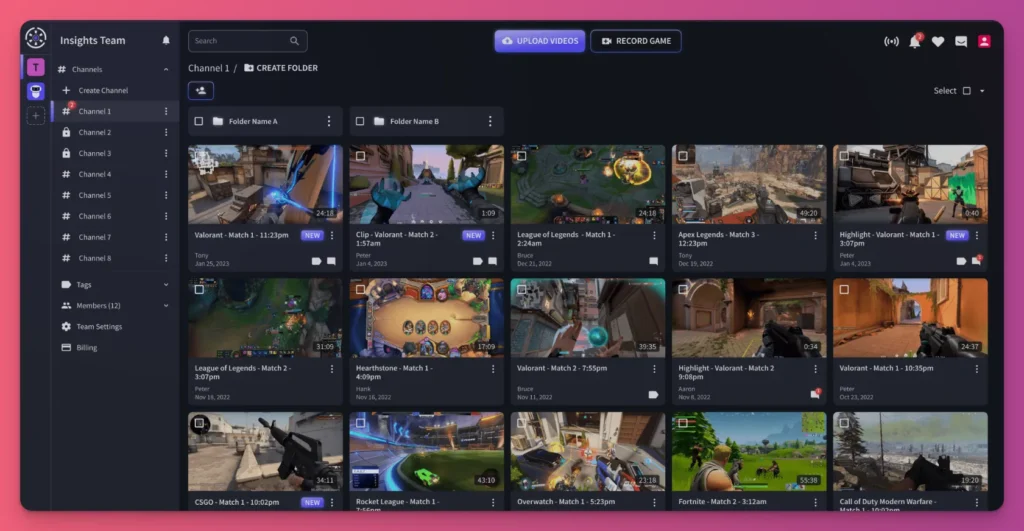
Insights.gg is one of the best clipping software options. Unlike other apps that require a large window, Insights uses a web dashboard, with the local recorder hidden in your system tray.
This lets your CPU focus on rendering the game and hardware acceleration. You won’t deal with UI lag or recording issues while reviewing your clips mid-match.

Power-User Features:
- Dynamic Instant Replay Buffer — Longest buffer: 30 seconds to 30 minutes for full recaps or multi-phase highlights.
- Smart Clip Scoring System — AI assigns a “highlight score” based on excitement, viewer retention, and viral potential.
- Format Conversion — AI creates 9:16 TikTok/Shorts and 16:9 clips with auto-captioning and trending audio suggestions.
- Clip Remix Engine — Auto-generates 15-60 second social media reels from top moments across sessions, removing manual editing.
- Advanced Clip Filters — Quickly find clips by AI score, game mode, performance, or emotional tags (hype, rage, funny).
Why choose this PC clipping software? If you care about good video quality and working with your team more than fancy meme effects, this is the one to use.
Related: How to Record Gameplay on PC
8. Powder PC
- Platform: Windows
- Price: Free
- Category: Free clipping software
Gamers, gaming creators, and editors. This clipping software is for you if you want to make TikTok-ready montages without touching Premiere.
Powder PC hooks right into Steam, launching like any game so it stays patched and crash-free mid-grind—unlike apps that ghost you during updates.
Its local AI highlight detection is impressive. It monitors your gameplay on Windows, avoiding upload delays and cloud limits.
Trained for over 40 games like Valorant, Fortnite, and CoD, it also has a “universal mode” that detects hype moments by listening for loud sounds and emotions, even in unsupported games.
Power-User Features:
- Flexible Instant Replay Buffer — Stores up to 10 minutes of gameplay. Save the last seconds or up to 10 minutes with hotkeys, and adjust the buffer length.
- Manual Clip Marking — Manually mark clips or use hotkeys to capture moments during gameplay, supplementing AI auto-capture.
- Built-In Clip Editor — Provides a simple timeline editor after recording to quickly trim unwanted parts and prepare clips for sharing.
- Vertical-First Automation — Detects the game and applies game-specific vertical layouts (e.g., centering HUD, stacking facecam) for TikTok-ready clips.
- Discord Auto-Posting — Connects to Discord to automatically post clips in a channel, keeping your community updated without switching tabs.
Why choose this PC clipping software? It’s ideal for high-quality clips without complicated editing. AI detection and customizable hotkeys make it easy to quickly capture highlight moments.
9. AMD ReLive
- Platform: Windows (Requires AMD Radeon GPU)
- Price: Free
- Category: Free clipping software
AMD ReLive challenges Nvidia ShadowPlay as more than just basic clipping software. It offers true hardware acceleration built right into Radeon drivers.
ShadowPlay might be the go-to for the green team, but ReLive is fighting back with AV1 encoding on RX 9000 cards. It cuts your 4K game highlight sizes in half compared to Nvidia’s H.264.
During those hours of Valorant sessions, ReLive’s dedicated silicon keeps your gameplay lag-free. Nvidia’s solution can sometimes drop frames on older GPUs.
Power-User Features:
- Instant GIF Creator — Save the last 5-30 seconds as a GIF via hotkey. It’s perfect for instant social sharing on Discord or Reddit without file size bloat.
- Eyefinity Support — Eyefinity is ideal for ultra-wide setups. It records resolutions across three monitors as a single video canvas.
- In-Game Overlay Browser — Access a fully functional web browser within the overlay. Watch tutorials or check walkthroughs while you’re still recording.
- Performance Telemetry Overlay — Bakes GPU metrics (junction temp, fan speed) directly into video clips. This is ideal for hardware reviewers.
Why this is your clipping software for gaming? AMD ReLive turns your graphics card into a watermark-free recorder, capturing clear 4K clips with smart detection to cut editing time.
10. Cross Clip
- Platform: Web, Android, iOS
- Price: Free / $5/mo
- Category: Post-Process Clipping App
You might not be familiar with Cross Clip until we mention Streamlabs. While OBS Studio offers recording features, Streamlabs Cross Clip is a tool that helps you create viral game highlights.
This clipping software is built with social sharing in mind. It recognizes that standard Twitch streams don’t fit the virality vibe of Instagram Reels, YouTube Shorts, or TikTok.
And so, Cross Clip fills that gap fast. It quickly turns horizontal footage into mobile-friendly, watermark-free clips.

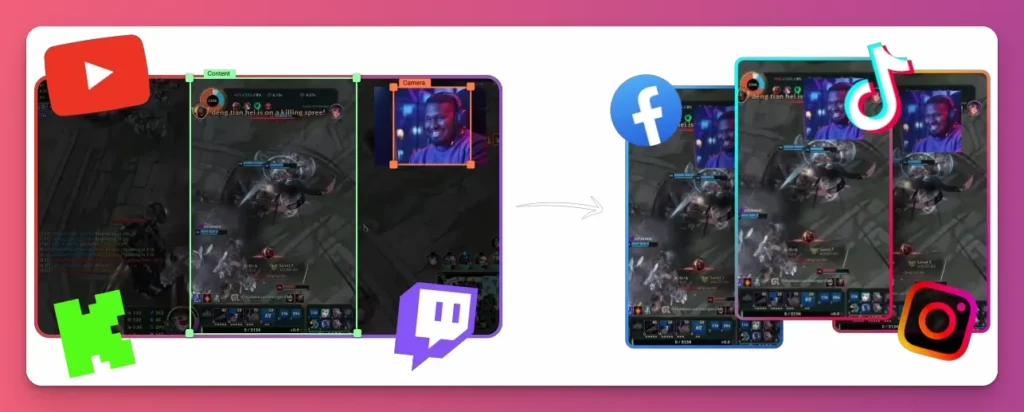
Unlike OBS, which can be slow and manual, Cross Clip automates the process for easy sharing.
Power-User Features:
- Mobile-First Workflow — Connect desktop clips to mobile apps using cloud sync or URL, then edit with touch, add text, and effects.
- Split View — Shows gameplay and webcam feeds stacked or side-by-side, cropping “Game” and “Face Cam” separately from a 16:9 source.
- Streamlabs Integration — Works directly with Streamlabs Desktop, letting you access high-quality recordings without downloading Twitch VODs.
- Shorts/Reels Optimization — Has ready-made templates for TikTok, YouTube Shorts, and Instagram Reels, so buttons don’t hide your text or facecam.
- Multi-Clip Compilation — Combine multiple clips into one video on mobile, making “Top Plays” montages from your gallery or cloud.
Why should gaming content creators try this clipping app? It boosts fast social media growth by turning long videos into viral shorts, with professional editing, no platform limits, and easy controls.
Related: How to Clip on Twitch
11. Assistant.gg
- Platform: Windows
- Price: Free / Starts from €4.99/month
- Category: True Clipper (Retroactive)
Want to get better at farming clips for games like ARC Raiders, Apex Legends, COD Black Ops 7, Marvel Rivals, and Battlefield 6?
This PC clipping software can help. It lets you clip automatically or manually, making it easy to create awesome gaming content for TikTok or Instagram Reels.
Unlike web-based rivals that require VOD uploads, Assistant.gg runs directly on Windows, detecting highlights in real-time during live gameplay without performance impact.
Power-User Features:
- Hands-Free Game Event Clipping — Connects to game APIs to automatically clip kills, deaths, or assists, unlike standard recorders.
- VOD from URL — Paste a Twitch, Kick, or YouTube stream URL; the app downloads and auto-clips highlights from the past broadcast.
- Voice-to-Subtitle Overlay — Transcribes microphone and Discord audio into embedded subtitles, eliminating manual captioning.
- Discord Bot Integration — Clips are sent to a specific Discord channel via its bot immediately after capture.
- Dual-Mode Audio Isolation — Choose “Game Audio Only” to remove background music or “All PC Audio” to include Discord and Spotify.
Do gaming content creators need to use this app? It turns long gaming sessions into shareable highlights with real-time auto-detection and voice subtitles, saving you hours of editing.
12. Gecata
- Platform: Windows
- Price: Free / $30 (One-time)
- Category: Session Recorder
Gecata by Movavi is a top-tier clipping software option. It captures lag-free gameplay in 4K at 120 FPS without any stuttering. It’s lightweight but powerful.
One great thing is its dual audio stream feature, which separates game sounds from your mic. That way, you can fix commentary mistakes without messing up the audio for your game highlights.

When you start games like Valorant or Fortnite, Gecata’s Game Mode kicks in automatically. No more “Oops, I forgot to hit record” moments when you’re in the heat of a match.
Power-User Features:
- Hardware-Accelerated Clip Saving — Uses NVIDIA NVENC to save Instant Replay clips from the buffer, preventing micro-stutters during critical moments.
- Lossless Cut — Trim clips instantly without quality loss; saves files without re-encoding, avoiding re-rendering delays.
- Minimalist UI — Focuses solely on local recording, making it beginner-friendly (though the free version has a watermark).
- Webcam Overlay in Real-Time — Move and resize your webcam overlay on a second monitor while playing, no alt-tabbing needed.
Why this clipping software might be for you? It’s the reliable choice for turning long sessions into sharp, high-quality clips with professional dual audio control.
13. CapCut
- Platform: Web, Windows, macOS, Android, iOS
- Price: Free / $9.99/month (Pro)
- Category: Post-Process Clipping App
Tired of endless Twitch streams that never hit TikTok’s viral scene? CapCut is your go-to for turning long sessions into quick game highlights that trend and boost your viewers on Twitch.
What makes CapCut different from standard clipping software is how well it’s built for social sharing. The templates are pre-set for vertical 9:16 videos with trending effects.
It connects straight to TikTok, so no re-uploading or messing with formats. The mobile app makes it easy to trim and post watermark-free clips during your gaming breaks.
Power-User Features:
- Dynamic Auto-Captions — Instantly transcribing audio with trending text animations to keep viewers engaged.
- Speed Ramping Curves — Simplifies smooth transitions between normal speed and slow motion, highlighting skill shots in gaming montages.
- Background Removal — Remove your facecam background without a green screen in vertical clips for a more immersive look.
- Viral Effect Library — Access trending TikTok effects, transitions, and meme sounds to match current trends.
- Direct TikTok Integration — Features a seamless “Export to TikTok” option, favoring clips edited in CapCut in the algorithm.
Why this app might be for you? One of the best clipping software for PC and mobile, with Auto Reframe and Cloud-sync Project Workflow to help your gaming content go viral.
14. OpusClip
- Platform: Web
- Price: Free / $15/month
- Category: Post-Process Clipping App
This clipping software isn’t designed exclusively for gaming, but it’s a powerful tool for video creators.
Its standout feature is the ClipAnything AI, which powers next-level auto-capture. It analyzes any genre to find clips with viral potential.

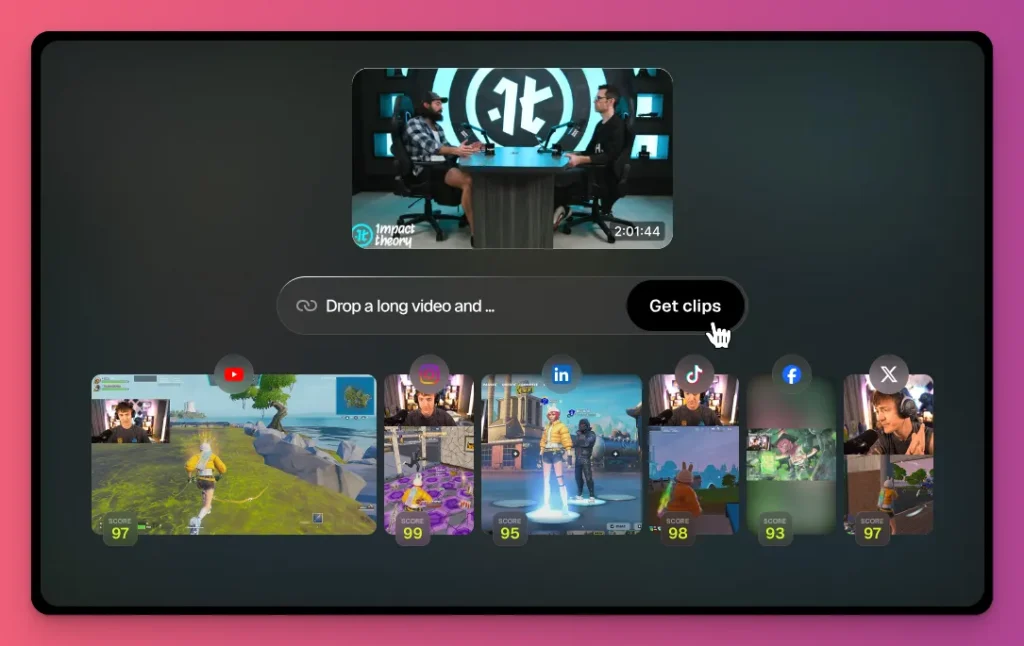
Unlike standard tools that rely on basic audio triggers, OpusClip identifies true game highlights based on engagement. It’s perfect for turning long Twitch streams into bite-sized gold.
On top of that, the tool streamlines your social sharing workflow. Drop a VOD link and get ten polished, watermark-free clips ready to publish instantly.
Power-User Features:
- Active Speaker Detection — Identifies who’s talking and centers the camera on them, ideal for collab content.
- AI Virality Score — Rates clips from 0 to 100 based on an algorithm trained on successful TikToks and Shorts.
- Filler Word Removal — AI deletes “umms,” “ahhs,” and silence, sharpening pace and engagement.
- Direct Social Scheduling — Schedule and publish clips directly from the dashboard, no phone needed.
- Natural Language Querying — Ask the AI, “Find every time I screamed” or “Clip the moment I won the 1v3 clutch.” It scans your footage and pulls out those moments.
What makes this a great clipping software? One of the best clipping software for PC and mobile, with Auto Reframe and Cloud-sync Project Workflow to help your gaming content go viral.
15. StreamLadder
- Platform: Web
- Price: Free / $9/month (Silver)
- Category: Post-Process Clipper (Repurposer)
Free to use, watermark-free, and easy to handle. What more could you want from clipping software? That simplicity makes this clipping software a top choice.
Its core features let creators get quick results without the complexity of OBS Studio. And unlike traditional programs that drag down your PC, StreamLadder offers a completely lag-free experience by running in the cloud.
Because it’s browser-based, you skip the heavy installs. It’s ideal for streamers who want to stay active on TikTok without wasting time on manual edits.
Power-User Features:
- Split-View Templates — Ready-made gaming layouts like “Blurred Background” to quickly adapt horizontal footage for mobile screens.
- ClipGPT — AI scans Twitch and YouTube VODs to find top moments, analyzing chat, audio, and on-screen action for engaging segments.
- Browser-Based — Cloud-based clipping software, edit clips from any device by pasting a Twitch or Kick URL. No need for your gaming PC.
- Auto-captions — Generate and embed text in a gaming font, ensuring captions stay visible even if viewers disable platform captions.
What makes this a great clipping software? One of the most affordable freemium clipping software where you can export without watermarks and get up to 30 clips per stream.
Game Clipping Software: A Wrap Up
You now have a clear overview of the best gaming clipping software. Each tool offers something different—instant replay, AI auto-capture, or simple social sharing.
Whether you’re a competitive gamer reviewing your plays or a content creator seeking viral moments, there’s an app to help you grow your views and followers.
Once you get those views, plan your monetization strategy. Don’t rely on Twitch subs or YouTube ads alone. At Gank, you can join for free and earn from fan donations, commissions, and merch sales.