



If you’re ready to use a capture card, the next step is to choose the best capture card for streaming that fits your setup.
Two cards can both say “4K60,” but one might run smoothly while the other drops frames. Worse? You might overspend on features you don’t need, with no performance gain.
To help you decide, here’s a quick guide to the best capture cards for creators, with clear pros and cons and tips before you pick one. Read this, and you’ll choose wisely.
Key Takeaways
- For new streamers, choose UVC plug-and-play capture cards, like the Elgato Game Capture Neo, that work instantly with OBS on any OS. This lets you go live faster.
- Skip cheap no-name clones if you want to buy a good capture card for streaming. Go with trusted brands like Elgato or AVerMedia for real specs and performance.
- For dual-PC streamers avoiding USB clutter, PCIe cards like the AVerMedia Live Gamer 4K 2.1 offer ultra-low latency and dedicated bandwidth, bypassing USB port issues.
- Make VRR passthrough a priority if you stream FPS games like Valorant or Apex Legends. Without it, your capture card blocks G-Sync or FreeSync, which causes tearing and input lag.
10 Best Capture Card for Streaming
Here are the best capture cards for streaming to help you make great content on Twitch and YouTube:
1. Elgato Game Capture Neo
- Price: $129.99
- Category: Entry-Level External Card
- Perfect For: Variety streamers, Nintendo Switch gamers
- Easy Setup: 9/10
This is one of the best capture cards for new streamers in 2026. Console streamers fear tough driver installs. And you just want to go live without scrolling Reddit for hours, right?
The Elgato Game Capture Neo is the answer. This card is basically a downgrade from the HD60 X, part of Elgato’s entry-level line.
By dropping VRR and 120 Hz pass-through, Elgato saves $60 without hurting core image quality. A trade-off most new content creators won’t miss.

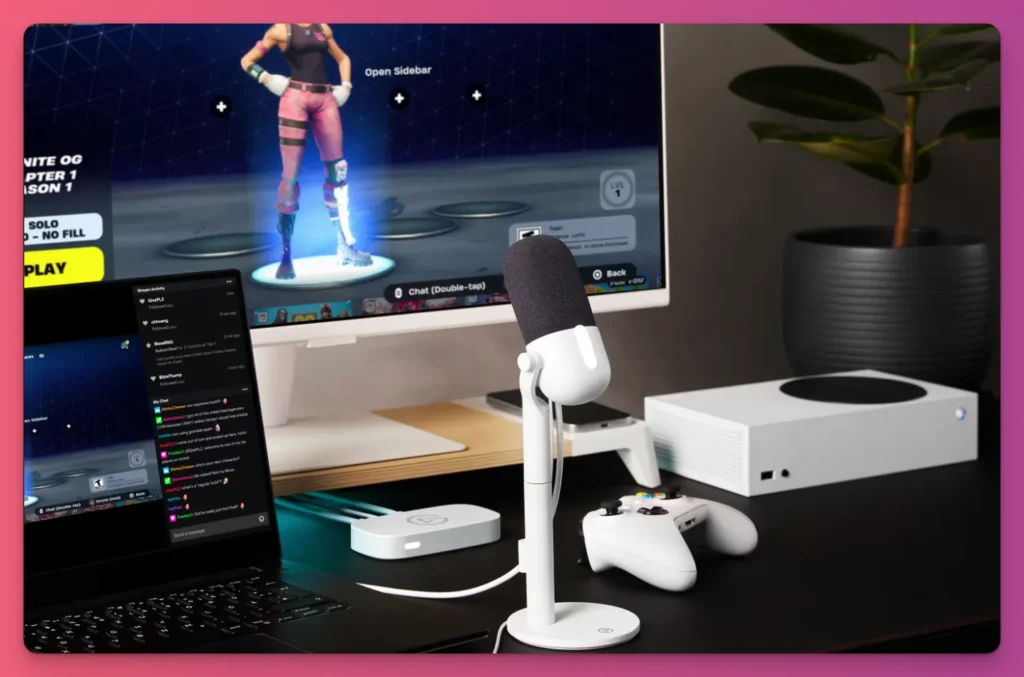
Consoles like the Nintendo Switch max out at 60 Hz anyway, and single-player games like Elden Ring or GTA VI don’t need high refresh rates.
Unique Features:
- Automatic Downscaling — Scales the stream to 1080p but still outputs 4K to your TV, fixes the “Input Out of Range” issue on cheap dongles.
- Minimalist White Aesthetic — Looks clean on modern lifestyle desks.
- Direct iPad Capture — Works with USB-C iPads for mobile-first streaming.
- Plastic-Free Build — The only mainstream capture card with 60% recycled materials and recyclable packaging.
Pros:
- Scales to 1080p while preserving 4K TV output, fixing the “Input Out of Range” issue on cheap dongles.
- 4K60 HDR pass-through for sharp, colorful local gaming.
- Driverless Utility; OBS-recognized on PC, Mac, and iPad.
Cons:
- Input lag at 60 Hz vs 120 Hz in shooters.
- Lacking VRR support can cause screen tearing in fast Valorant or Apex matches.
- No 3.5mm analog input; PS5 party chat needs routing a Chat Link cable to the PC line-in.
2. Elgato HD60 X
- Price: $179.99
- Category: External USB 3.0 capture card
- Perfect For: Console gamers who need VRR for smooth gameplay
- Easy Setup: 8/10
We get that not all streamers can use the Elgato Game Capture Neo. So, if you’re willing to pay a few dollars more for features like VRR passthrough, the Elgato HD60X could be your pick.
Setup remains simple, with HDMI and USB cables included. And this time you don’t have to choose between a laggy monitor and a good-looking stream.

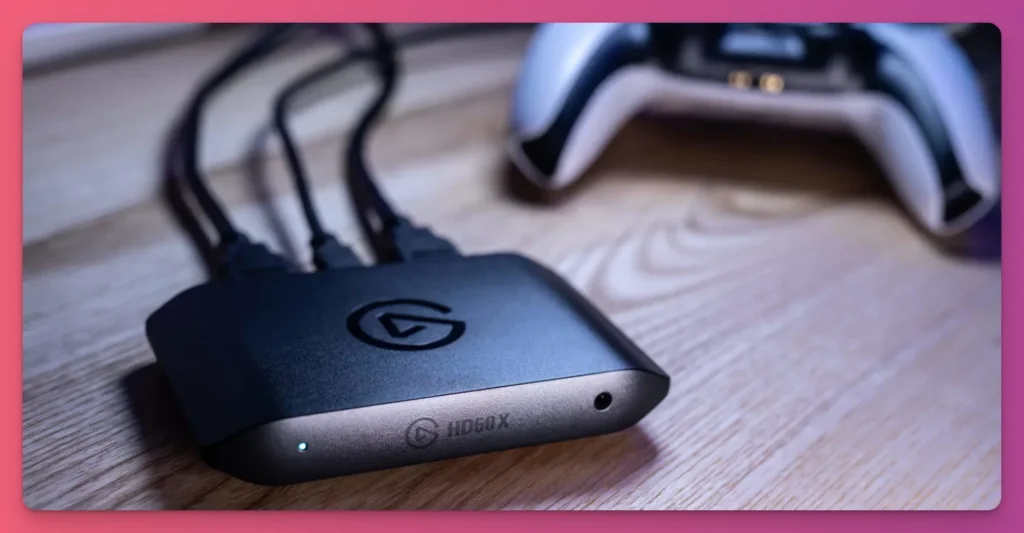
You’ll also enjoy higher capture frame rates. The HD60X captures 1440p60, while Neo tops out at 1080p60, and it adds a 3.5mm analog audio input for consoles without PC line-in.
While newer models like the 4K S use HDMI 2.1, the HD60X stays a reliable HDMI 2.0 UVC option.
Unique Features
- VRR passthrough — Stops screen tearing on your main gaming monitor.
- Analog audio input (3.5mm) — Connect your console party chat directly without expensive external mixers.
- 1440p60 capture — Better quality than 1080p for YouTube Shorts and TikTok vertical clips.
- Backward compatibility — Works with older 1080i signals for retro games and speedrun streams.
Pros
- VRR helps reduce input lag, keeping monitors responsive for competitive streamers.
- YouTube Shorts creators can reuse 1440p clips for higher-quality vertical uploads.
- Built-in audio port lets console streamers avoid extra adapters.
Cons
- Only 4K30 capture, so high-res 60fps footage isn’t possible.
- Passthrough caps at 4K60, meaning you can’t play in 4K120 even if your TV supports it.
- No dedicated headset jack; separate audio routing is still needed.
3. NZXT Signal HD60
- Price: $99.99
- Category: External USB 3.0 capture card
- Perfect For: Budget-conscious streamers who want a durable, minimalist streaming setup
- Easy Setup: 8/10
If you’re after the best capture card for streaming but not Elgato, NZXT Signal HD60 should be on your radar.
What makes this card stand out is its plug-and-play ease. It works right away with OBS, Streamlabs, and more.

It’s affordable for new streamers. You don’t want to drain your budget on gear and miss out on a decent mic as a beginner, right?
The NZXT Signal HD60 gives 1080p60 quality for $30 less than the competition, while staying simple and reliable.
Unique Features
- Compact 100mm form factor — small enough to hide behind a monitor on a crowded desk.
- Simplified plug-and-play — uses standard UVC to avoid proprietary software bloat and background processes.
- Minimalist design — fits perfectly with black-and-white PC builds and clean desk aesthetics.
Pros
- Minimalist PC setups pair well with NZXT’s clean black-and-white design.
- Plug-and-play removes driver problems and compatibility worries.
- 4K60 passthrough happens with no noticeable delay.
Cons
- No VRR causes screen tearing in fast-paced games like Warzone or Fortnite.
- Passthrough is capped at 60Hz, preventing the use of “Performance Modes” on consoles.
- The product is 3 years old, which makes it harder to find the products.
Related: Best Live Streaming Encoders
4. Asus TUF CU4K30
- Price: $209.99
- Category: External USB 3.2 Gen 1 capture card
- Perfect For: Travel streamers and dorm-room setups who need high durability
- Easy Setup: 7/10
The best capture card for streaming isn’t just about 4K specs. You also want solid build quality, a good price, and easy setup.
The Asus TUF CU4K30 shines for travel streamers or tight dorm rooms, easily slipping into a backpack.

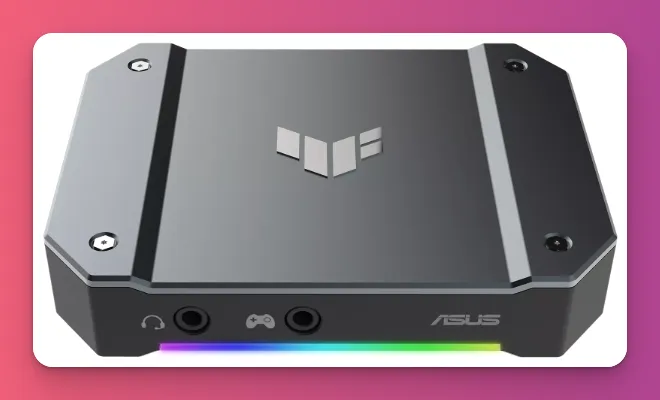
Measuring 105x80x21 mm and 173 g, its compact aluminum shell beats plastic rivals like the NZXT Signal HD60.
Beyond its rugged look, this card is a high-performance signal bridge. It does 4K60 HDR Passthrough and excels at high-refresh-rate bypass, handling 1440p144 and 1080p240 with ease.
Unique Features
- Aluminum chassis — keeps things cool without any fan noise in your mic.
- Dual 3.5mm jacks — lets you hook up both your controller and headset for a “Console Party Mode” setup.
- Status-coded RGB lighting — changes color to show hardware errors or active recording modes.
Pros
- Tough enough to carry in a bag without worrying the plastic case will crack.
- VRR support syncs your monitor’s refresh rate with your console to reduce stutter.
- Console streamers can use the dual audio jacks to streamline party chat routing.
- Silent operation prevents fan noise from spoiling your ASMR or quiet streams.
Cons
- UVC-compliant, but advanced lighting and audio control require the Armoury Crate utility.
- Finding specific tutorials is tougher outside the larger Elgato ecosystem.
- Device updates require a Windows tool and aren’t as intuitive as Elgato’s one-click updates.
5. Elgato Game Capture 4K X
- Price: $249.99
- Category: External USB 3.2 Gen 2 capture card
- Perfect For: Creators building YouTube highlight content
- Easy Setup: 7/10
If you’re looking at the best capture cards from Elgato, but Game Capture Neo isn’t your choice, check out the Elgato Game Capture 4K X.
This small USB 3.2 Gen 2 card is Elgato’s strongest portable option and uses HDMI 2.1 for true next-gen capture.

Whether you’re playing ranked Valorant at 240 Hz or recording next-gen console games at 4K 144, the Elgato Game Capture 4K X keeps every frame without compromise.
It works with 4K Capture Utility, OBS Studio, and Stream Deck macros. One press on your Stream Deck can switch scenes, start/stop recording, or snap a pic.
Unique Features:
- 4K144 or 1080p240 capture — Highest frame rate from Elgato external.
- HDMI 2.1 Interface — Supports ultra-high bandwidth for both input and output passthrough.
- Elgato ecosystem — Stream Deck enables one-button camera/lighting control.
- VRR at all resolutions — No screen tearing.
Pros:
- 240fps slow-mo looks professional and not blurred.
- Elgato ecosystem workflow is unmatched (Stream Deck integration).
- Plug-and-play with OBS, Streamlabs, TikTok Live.
- Compact in size.
Cons:
- 4K120/144 files are huge (1 hour is about 300GB; external SSDs are recommended).
- Might be overkill if you’re just streaming on Twitch.
- HDR capture only on Windows (macOS users get SDR).
- Quite expensive for new streamers building their Twitch channel
Related: Best DSLR Camera for Streaming
6. AVerMedia Live Gamer Ultra 2.1
- Price: $209.99
- Category: External USB 3.2 Gen 2 capture card
- Perfect For: Creators needing 4K144 HDR passthrough and 1080p240 recording
- Easy Setup: 7/10
As a gaming streamer, you often face a choice between Performance (smooth 144Hz) and Quality (high-resolution recording).
Older capture cards force a compromise, capping your gaming monitor at 60Hz just to get the signal. You lose the competitive “feel” and responsiveness of the game just to go live.

The Live Gamer Ultra 2.1 uses a fast HDMI 2.1 connection to pass 4K144 HDR signals without changes. This removes extra delay, so gameplay stays instant on your monitor.
Many streamers praise this capture card for being awesome. “Being able to play my games in 4K, HDR, VRR and 60-120 fps on my Xbox Series X is amazing..”
Unique Features:
- Up to 4K144 capture — High framerate capture on Windows (via Streaming Center).
- 4K144 HDR passthrough with VRR — Tear-free, even in competitive streams.
- Dedicated party chat ports — Integrated 3.5mm jacks for streamlined console audio routing.
- 5.1 surround sound — Rare among external cards; others typically offer stereo.
Pros:
- Competitive streamers keep monitor response fast with VRR passthrough.
- YouTube video collections that show esports moments in slow motion
- Console streamers skip buying extra cables because the 3.5mm chat link is included in the box.
- Ultra-wide support (3440x1440p at 120Hz) for sim racing/MMO streams.
Cons:
- 4K60 HDR streams reach around 400GB each.
- Requires USB 3.2 Gen 2 (USB-C); older PCs may lack the port.
- Twitch limits to 1080p60, so 4K144 passthrough mostly helps with local gameplay.
- Driverless UVC design makes setup easy, but learning OBS settings is needed for best results.
7. AVerMedia Live Gamer 4K 2.1
- Price: $229.99
- Category: Internal PCIe Gen 3 x4 capture card
- Perfect For: Dual-PC streamers who want 4K144 HDR/VRR passthrough with zero USB cable clutter
- Easy Setup: 3/10
If you’re a serious gaming streamer tired of USB capture cards cluttering your desk with wires, check out an internal PCIe capture card like the AVerMedia Live Gamer 4K 2.1.
No more loose cables getting in your way. Plus, the Live Gamer 4K 2.1 is the first HDMI 2.1 internal PCIe capture card for consumer streaming, unlocking next-gen console potential.

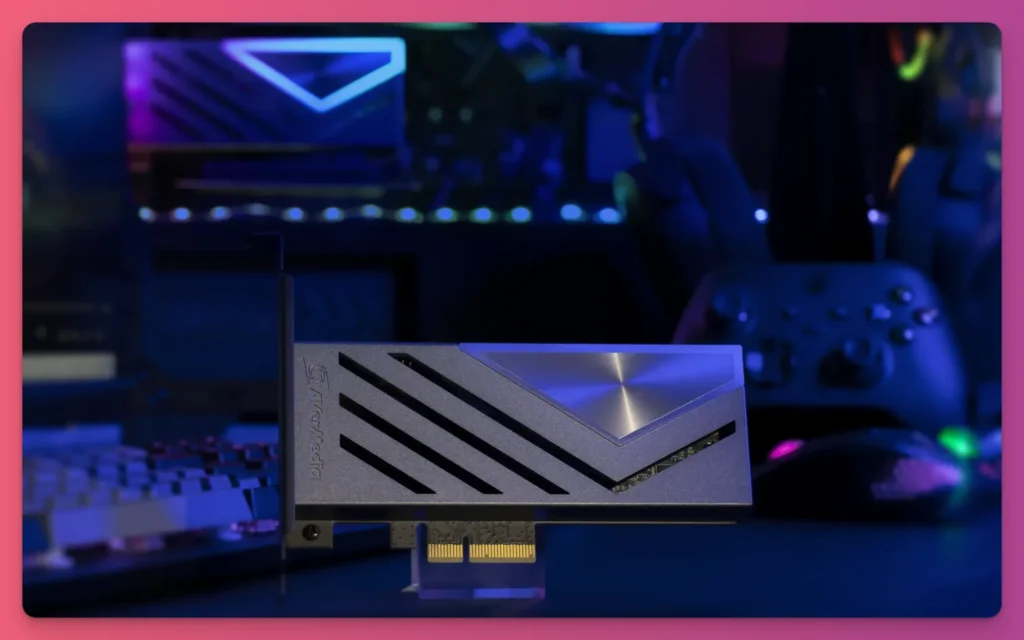
This card plugs straight into your motherboard’s PCIe slot. It gives you ultra-low latency and dedicated bandwidth.
Your 4K144 passthrough stays smooth while your HD streaming PC gets a clean, uncompressed signal. But you’ll have to pay about twice what the Elgato Capture Neo asks.
Unique Features:
- First HDMI 2.1 internal PCIe card — 4K144, 1440p240, 1080p360 passthrough and capture support.
- PCIe Gen 3 x4 direct connection — No USB bandwidth competition or cable clutter.
- 5.1 surround sound support — Supports multi-channel audio capture on Windows.
- Ultra-wide resolution support — Natively handles 3440x1440p @ 120Hz for immersive gaming.
Pros:
- Highest passthrough specs available with 4K144 and VRR support.
- Zero USB cable clutter due to internal motherboard installation.
- Rock-solid reliability stops USB disconnects during eight-hour streams.
- Make 4K60 HDR video future-proof for high-quality YouTube.
Cons:
- You need a free PCIe x4 slot, which might not be on smaller motherboards.
- Installing it inside the PC case isn’t beginner-friendly.
- Premium pricing makes it a big investment for new creators.
- Great for a dual-PC setup, overkill for single-PC streamers.
8. RODE Streamer X
- Price: $299.99
- Category: External hybrid video capture & audio interface
- Perfect For: Solo creators needing high-end XLR audio and video in one device
- Easy Setup: 6/10
The RØDE Streamer X isn’t just a capture card for streaming. It’s an all-in-one audio interface, video capture card, and control surface made for streamers and creators.
It costs about $299, so it’s a premium buy, not a starter tool. It has a studio-quality XLR interface, 4K30 video capture, and programmable pads in one small unit, cutting down desk clutter.

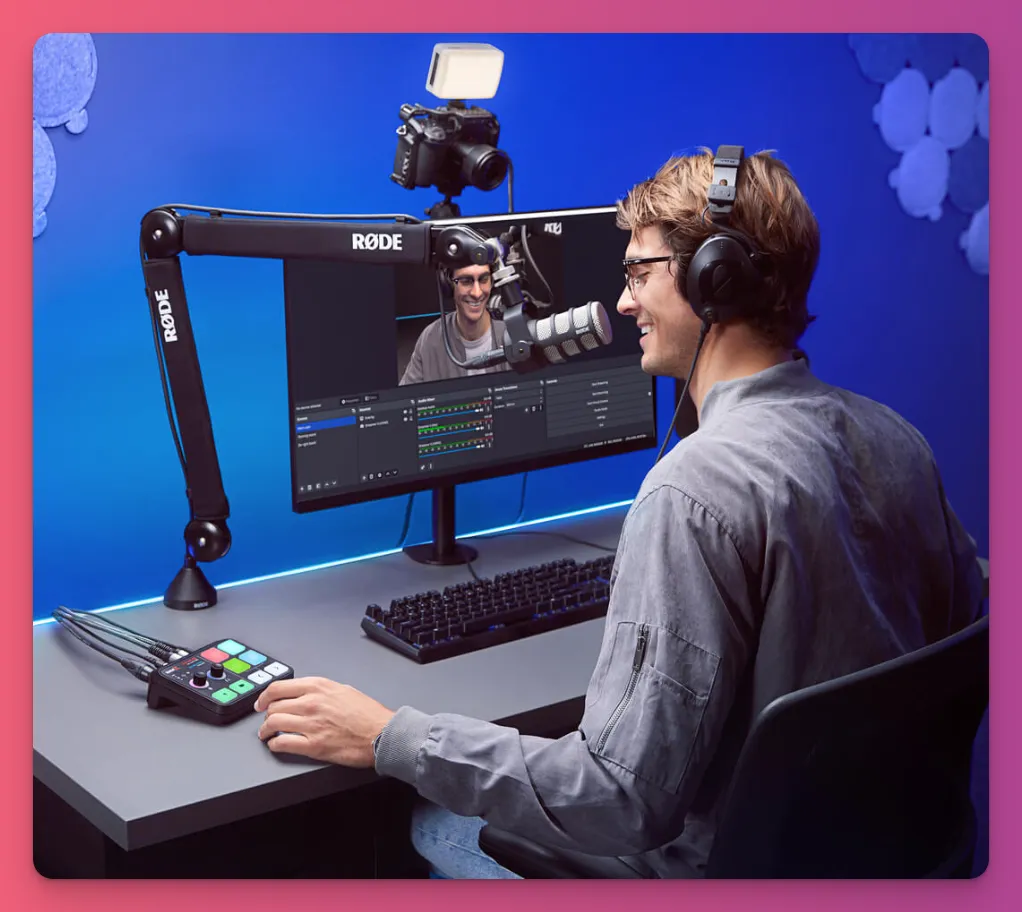
So, who’s it for? Creators who want a cleaner setup. Instead of buying separate gear for an XLR mic, a camera or console, and a Stream Deck, the Streamer X handles it all.
Beginners might pass because of the price, but pros love the smooth workflow that feels like a mini RØDECaster.
Unique Features
- XLR/TRS combo jack — It has a high-gain Revolution Preamp for studio-grade mics.
- Customizable SMART pads — You can trigger audio effects, MIDI commands, or OBS scene changes physically.
- Dual USB-C ports — Great for dual-PC streaming, with dedicated audio and video routing.
- Built-in wireless receiver — Connects directly to RØDE Series IV wireless mics without adapters.
Pros
- It replaces a GoXLR and a capture card, saving $300 and desk space.
- It makes audio routing easier by combining game sound and your mic into one driver.
- The SMART pads act like a built-in Stream Deck for creators on a budget.
- The premium preamp makes a $150 mic sound like a $500 studio condenser.
Cons
- At around $300, it’s a big investment if you already have a USB mic.
- If one part breaks, you basically lose your whole game streaming setup.
- Video capture maxes at 4K30, below what dedicated gaming GPUs offer.
9. AVerMedia Live Gamer Bolt
- Price: $349.99
- Category: External Thunderbolt 3 capture card
- Perfect For: Creators needing uncompressed, ultra-low latency
- Easy Setup: 7/10
If you want PCIe-style performance without opening your PC, go with an external Thunderbolt 3 capture card like the AVerMedia Live Gamer Bolt.
It’s one of the best capture cards for streaming and a solid pick if you want to be ready for high-quality production.

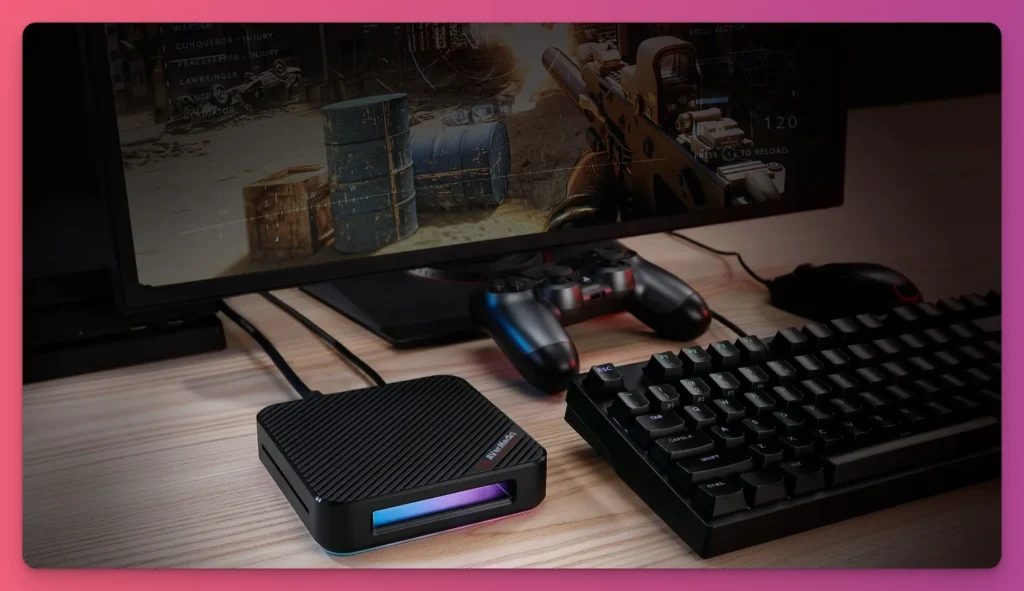
The Bolt uses Thunderbolt 3’s 40 Gbps to capture uncompressed 4K60 HDR with under 50 ms latency, nearly as fast as internal cards like the Live Gamer 4K, and way faster than USB 3.0.
So this is great for Mac users, and elite laptop streamers often struggle with standard USB capture cards that add lag.
Unique Features
- Thunderbolt 3 interface — sends uncompressed video with sub-50 ms ultra-low latency.
- 240 FPS recording — shoots at 1080p for extreme high-speed slow-motion montages.
- Active fan cooling — a precision-cut aluminum body with an internal fan to prevent thermal throttling.
Pros
- Very low latency makes it feel like you’re playing directly on the OBS preview window.
- Premium metal build that matches the aesthetic of high-end hardware.
- Handles 4K60 HDR capture without frame drops, even in intense long-form sessions.
Cons
- Compatibility is a nightmare. It looks like USB-C but won’t work with 90% of standard PCs.
- At $350, it’s expensive, on par with the Elgato 4K X.
- The internal cooling fan emits audible noise (35 dB+) that sensitive mics can detect.
10. Magwell USB Capture HDMI 4K Plus
- Price: $545.00
- Category: External USB 3.0 FPGA-based capture card
- Perfect For: Professional production
- Easy Setup: 9/10
Yes, this might be old. But the Magewell USB Capture HDMI 4K Plus is a professional, reliable capture device that works with many programs and delivers 4K resolution.
This card is pricier than consumer cards and targets production and AV workflows, not beginner game streaming.
It captures up to 4K30 over USB 3.0 and supports high-frame-rate 1080p120 for fast-motion recording. In practice, it acts as a regular UVC device. No special drivers are needed, and it’s compatible with OBS.
Unique Features
- 4K DCI resolution — give you real cinema quality, not just regular 4K.
- FPGA-based processing — performs scaling, cropping, and deinterlacing on the device, saving your CPU.
- Extensive OS compatibility — works well with Chrome OS, Linux, Windows, and macOS.
- EDID editing and importing — lets you customize signal talk for complex hardware setups.
Pros
- Indispensable in live events: never crashes, a trusted backbone for production studios with no room for a second take.
- Offloads video scaling from your CPU to the onboard FPGA, so you still have power for other tasks.
- Built to endure: professional-grade parts that outlast several PC upgrade cycles.
- Great for multi-cam setups where sync and reliability matter most.
Cons
- Way too pricey at $500; you could buy a PS5 and two games for the same price.
- No HDMI passthrough, so you’d need a separate $100 HDMI splitter for gaming.
- Missing gamer-focused features like VRR, high refresh rates, or RGB lighting.
- Overkill for solo creators; the value shines for professional production companies.
Tips for Choosing the Best Capture Cards
You found the best capture card for streaming in 2026. Here are tips to help you choose the right one:
- Choose Plug-and-Play Cards First — Grab the best capture cards that support “USB Video Class” (UVC). OBS will see them like a regular video device, no extra software needed. They work with Windows, Mac, and Linux too.
- Get VRR Passthrough — Even if your stream output is capped at 1080p, your gaming monitor likely uses Variable Refresh Rate. Without VRR Passthrough, a capture card disables G-Sync or FreeSync. This can cause screen tearing and lag.
- Check for Physical Audio Monitoring. A common problem for new creators is audio setup. Get the best capture card with a 3.5mm analog port. This “Chat Link” lets you hear game audio and capture party chat directly, skipping complex mixers or external gear.
- Ask for an Aluminum Body — Plastic cases are lighter but overheat during extended use. An aluminum frame acts as a natural cooler, preventing skipped frames or looking choppy during long broadcasts.
- Avoid “No-Name” Amazon Clones — Generic cards say they’re 4K, but they use heavy MJPEG and end up with a blurry 30fps video. Stick with brands you trust like Elgato, AVerMedia, or ASUS to get real YUV or NV12 uncompressed video.
- Verify Multi-App Access — Higher-end cards support “Multi-Stream” or Multi-App functionality. This lets you send the raw feed for high-bitrate 4K local recording while simultaneously using the same signal in OBS for a 1080p stream with overlays.
- Match the Interface to Your Host PC — For laptops, a USB 3.2 Gen 1 external card is standard. For desktops, choose an internal PCIe card to minimize bus bottlenecks and keep a clean, cable-free look.
- Look for On-Board Downscaling — Choose the best capture card for streaming with internal resolution scaling to cut CPU overhead. If you game in 4K and stream 1080p, built-in downscaling saves power and stabilizes frame rate.
- Choose 10-bit Color Support — Even for non-HDR streams, 10-bit passthrough prevents color banding on your gaming monitor. It keeps the display’s full HDR10 color and vibrant game visuals even as the capture output is web-compressed.
Best Capture Cards: A Wrap-Up
You’ve just explored the best capture cards for streaming, from the affordable Elgato Game Capture Neo to the capable AVerMedia Live Gamer Ultra 2.1.
Sometimes the goal isn’t the single best 4K capture card. It’s the one that fits your setup.
So, choose wisely and spend less time tweaking and more time streaming. That speeds up growth and unlocks monetization through Twitch Partner, brand deals, sponsorships.
Or, you can join Gank to earn more from your content through fan donations, merchandise sales, and commissions. Ready to join now?